Article
How to Generate PBR Textures Without Machine Learning

Generate PBR textures without machine learning using fast, browser-based procedural algorithms. Learn why non-AI methods are faster, more predictable, and more production-ready for 3D artists.
Procedural vs ML Texture Generation
Most people assume PBR texture generation requires machine learning — but that’s not true. Many studios still rely on procedural, physics-driven algorithms because they give consistent, predictable results without relying on massive GPU models.
Here’s the difference:
Machine Learning (AI-Based) Generators
Use neural networks trained on huge datasets
Require cloud GPUs, inference time, and server resources
Can be slow depending on model size
Sometimes produce inconsistent or stylized results
Require uploading textures (privacy concern)
Procedural Texture Generators (Non-AI)
Use deterministic mathematical functions
Run instantly in the browser via WebGL/WebGPU
Require no internet, no uploads, no servers
Produce industry-standard PBR maps (Normal, AO, Roughness, Height, etc.)
More stable for professional workflows
Procedural tools like GenPBR use the same underlying techniques found in game engines and 3D renderers — meaning the results match real rendering pipelines.

Why Non-AI Is Faster
Procedural algorithms outperform machine-learning generators because they avoid the heavy lifting of model inference.
AI Has Built-In Bottlenecks
Model warmup time
GPU queue delays
Input upload/download cycles
Inference computation (often 200–2000ms per map)
Throttling based on cloud capacity
Even the “fastest” AI-based texture tools depend on server hardware availability.
Procedural Generators Skip All That
Run 100% in-browser
Use your GPU directly
Zero upload/download time
Instant processing (often < 150ms)
No model to load or warm up
Unlimited regeneration at no cost
Because the PBR calculations are purely mathematical (filters, frequency extraction, curvature estimation, noise functions), they execute almost instantly — especially with WebAssembly and WebGL acceleration.
This is why PBR textures without machine learning are not only possible, but often better for real-time workflows.

How GenPBR’s Algorithms Work
GenPBR uses optimized, non-AI algorithms based on real physically-based rendering principles. These methods are common in engines like Unreal, Unity, and Blender’s Cycles/Eevee.
Here’s what happens under the hood:
1. Frequency & Height Extraction
GenPBR analyzes the diffuse map to estimate micro-height detail using:
Sobel kernels
Laplacian operators
Multi-frequency decomposition
Curvature approximations
This produces clean Normal, Height, and AO maps without requiring AI guessing.
2. Reflectance & Roughness Modeling
Roughness maps are generated through:
Local contrast analysis
Edge flattening
Material reflectance curves
Specular response estimation
All computed in real time.
3. Procedural Cleanup & Enhancement
Users can adjust:
Strength
Detail levels
Smoothness
Inversion
Sharpening
Material-specific presets
These tweaks are instant because everything happens in the browser.
4. Fully Local Processing
No upload. No server. No cloud GPU.
Everything stays on your device — a major advantage for studios handling proprietary textures.
Example Outputs
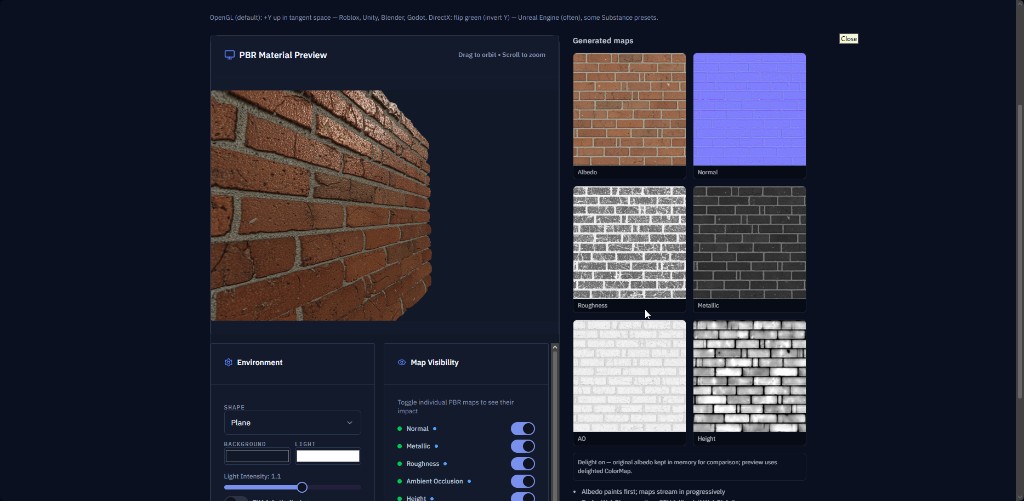
Here’s what you can generate in seconds using GenPBR’s non-AI engine:
1. Normal Map Output
Before: Flat diffuse texture
After: High-frequency micro-detail extracted into a crisp normal map (ideal for game engines)
2. Roughness Map
Before: Standard photo material
After: Smooth/rough areas identified and converted into realistic reflectance data
3. Ambient Occlusion
Before: Plain diffuse
After: Accurate shadowed crevices and softened cavity lighting
4. Full PBR Pack (Instantly)

Diffuse
Normal
Roughness
Height
Metallic
AO
Generated on the fly — without machine learning.
About Star
GenPBR is a professional tool for generating PBR textures using industry-leading algorithms. Create photorealistic materials for games, architecture, and 3D art with proven techniques for Unity, Unreal Engine, Blender, Maya, and Roblox.