Article
Why GenPBR is Faster than AI-Based Texture Generators

Discover why GenPBR’s algorithm-based PBR generator can be significantly faster, more predictable, and more secure than AI-based texture generators — especially for serious 3D workflows.
As AI-driven tools for generating textures become more common, it’s smart to ask: Are they really the fastest or most reliable choice for PBR workflows? For many 3D artists, GenPBR offers a compelling alternative — and in important ways, it’s faster than AI-based texture generators.
Here’s why.
1. Client-Side Processing = Instant Generation
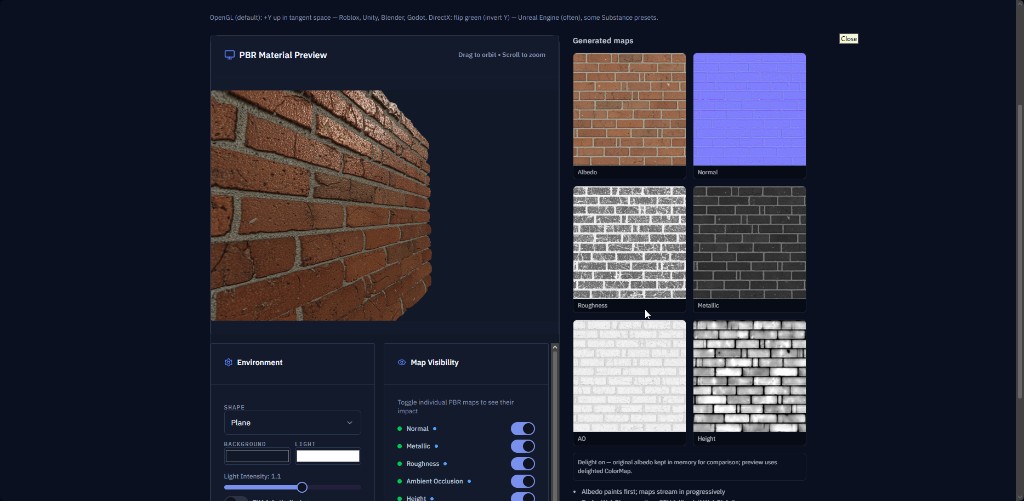
Unlike many AI-based PBR tools that require you to upload textures to a remote server, GenPBR processes everything in your browser, locally on your machine. That means zero upload time, zero round-trip latency, and instant feedback. The moment you hit “Generate,” the algorithms run on your CPU or GPU — no cloud queue, no server wait.
In contrast, many AI tools run on server infrastructure. You often have to wait several seconds (or more) for an image to upload, be processed, and return, which adds up especially if you’re generating lots of textures.
2. Proven Mathematical Algorithms vs Black-Box AI
GenPBR uses carefully designed, mathematically precise algorithms rather than a neural network “black box.” These algorithms are optimized for PBR map generation — normal, roughness, metallic, ambient occlusion — without relying on AI training data or inference steps.
Because these algorithms are deterministic, the same input always produces the same output, which helps maintain consistency in your pipeline, especially for version control in production workflows.
AI-based tools, on the other hand, may produce slightly different results each time because of their probabilistic nature, which can slow down iteration if you're trying to refine a result.
3. No Server Rate Limits or API Quotas
Because GenPBR does its work entirely in your browser, there are no external API rate limits or usage quotas. You’re not hitting a remote server with every texture — you’re running code locally.
AI texture services frequently throttle usage, especially on free tiers or pay-per-use models. That means repeated texture generation could be delayed, or you might pay more to unlock more capacity.
4. Faster Feedback Loop With Real-Time Controls
GenPBR gives you live parameter controls. You can tweak normal strength, roughness intensity, and other settings and instantly see results — because the computation is happening locally.
This real-time feedback is faster than typical AI generators, where you often have to regenerate entire textures for each tweak. With AI, each change may require another upload and another server run, which slows down experimentation.
5. Offline and Secure Workflow
Since GenPBR doesn’t rely on a server for image processing, you can use it offline (after initial page load). This is a major speed and security advantage for:
Artists working in remote or low-bandwidth environments
Sensitive projects where you don’t want proprietary textures uploaded to a third-party server or AI
Pipelines with strict privacy requirements
AI tools typically require a constant internet connection and may handle your assets in ways that raise security concerns.
6. No Training Overhead or Size Limits
GenPBR’s approach doesn’t need any training — just a base texture, and the algorithms do the rest. There’s no model to load, no pre-trained weights to download, and no variations in inference speed based on model size. This keeps the tool lightweight and extremely responsive.
Many AI-based texture generators, by contrast, load large neural networks (sometimes hundreds of MBs or more) into memory, which can introduce latency or demand a powerful GPU to run efficiently.
When AI-Based Generators Still Make Sense
AI texture generators aren’t useless — they shine when you want creative, stylized, or highly varied textures (especially generated from prompt-based systems). If you need totally novel materials or want to experiment with new looks, AI tools can be great.
But for predictable, high-fidelity, PBR-accurate map generation, GenPBR’s algorithmic, client-side speed often outperforms or complements AI solutions.
Final Thoughts
GenPBR is faster in many real-world workflows because everything happens locally, without server uploads or rate limits.
Its algorithmic approach yields consistent, reproducible results that are ideal for production.
Real-time control and offline accessibility make iteration smooth and secure.
For artists building serious PBR libraries or working in professional pipelines, GenPBR’s speed advantage is a major plus.
If you haven’t already, try the GenPBR free generator today to feel the speed difference yourself.
About Star
GenPBR is a professional tool for generating PBR textures using industry-leading algorithms. Create photorealistic materials for games, architecture, and 3D art with proven techniques for Unity, Unreal Engine, Blender, Maya, and Roblox.