Article
GenPBR vs TexturesFast: honest comparison of pricing, channels, and workflow fit

TexturesFast published a vs page calling GenPBR a limited free extractor. This response covers real pricing (~$10/mo vs ~$39/mo), metallic map exports, deterministic output, and when each tool fits image-to-PBR vs text-to-texture workflows.
Last updated: September 2026. TexturesFast pricing and token rules change; verify their public pricing page before budgeting.
Why TexturesFast published a GenPBR comparison page
In 2026, TexturesFast published a vs page positioning GenPBR as a limited free extractor: 1024px cap, no metallic map, no paid upgrade story. That framing is incomplete.
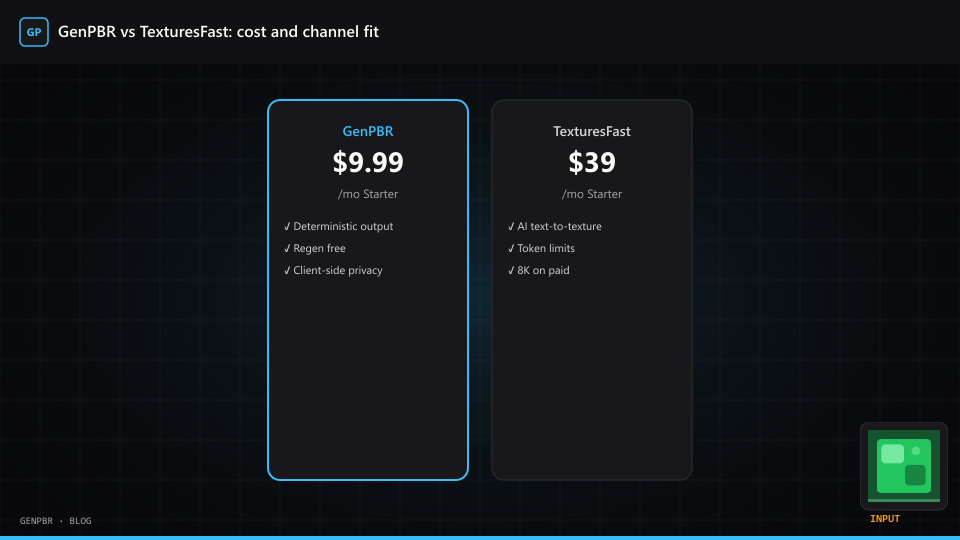
GenPBR exports normal, metallic, roughness, AO, and height from /generate. Paid plans start around $10/month with unlimited resolution on paid tiers. TexturesFast paid plans start around $39/month with monthly token allowances that reset each billing cycle.
This article is our good-faith response for teams searching GenPBR vs TexturesFast or TexturesFast alternative.
What each product optimizes for
TexturesFast is an AI texture platform:
- Text-to-material from prompts
- Style presets (photoreal, stylized, handpainted, pixel art)
- Image-to-PBR extraction via cloud inference
- Token-metered billing (~1,500 tokens/mo on Starter, per public pricing)
GenPBR is a deterministic browser PBR generator:
- Image-to-PBR with algorithmic channel extraction
- Client-side processing (source plates stay on your device during generation)
- Free tier without signup; paid tiers from ~$10/mo
- Regenerations on the same image are free
Neither is universally better. They solve overlapping problems with different cost curves.
Pricing: where GenPBR is much cheaper
| Tier | GenPBR (2026) | TexturesFast (public pricing) |
|---|---|---|
| Free | 512px anonymous; 1024px free account | No perpetual free tier for production token use |
| Entry paid | ~$9.99/mo Starter | ~$39/mo Starter |
| Mid paid | ~$19.99/mo Pro | ~$99/mo Pro |
| Billing model | Credits + unlimited res on paid | Monthly tokens; unused balance resets |
For indie teams running dozens of props per month, GenPBR's price floor matters. TexturesFast's value shows when you need prompt-driven synthesis, not when you already have a plate.
Channel accuracy: metallic is not missing on GenPBR
Some comparison pages list GenPBR without metallic exports. That is outdated or incorrect. GenPBR ships:
- Normal map generator output
- Metallic map generator output
- Roughness map generator output
- AO and height channels
If your engine uses metal/rough, verify exports in-engine rather than trusting third-party tables.
When TexturesFast is the better fit
Be honest with your team:
- You need text-to-texture without a source photograph
- You want style presets for stylized or pixel-art directions
- You accept AI variability and token spend for exploratory looks
- You need 8K on day one and will pay for it
TexturesFast's FAQ describes three workflows: text to material, extract material, and image to maps. GenPBR focuses on the third, with deeper deterministic tooling.
When GenPBR is the better fit
- You have a reference plate and need channels fast
- You want predictable output for pipeline docs and QA
- Budget is $0 to ~$20/mo, not $39+ before you ship
- You iterate heavily on one plate (free regenerations)
- Privacy matters: on-device generation during browser sessions
Side-by-side evaluation script
- Pick one albedo/reference plate from your game.
- Run it through GenPBR and TexturesFast image-to-maps.
- Import both into your engine (Unity checklist, Roblox handoff).
- Time the loop: click count matters for affordable workflows.
- Read license terms for commercial shipping.
Related reading
TexturesFast is a trademark of its respective owner. GenPBR is independent; this article compares workflows, not official partnerships.
About Star
GenPBR is a professional tool for generating PBR textures using industry-leading algorithms. Create photorealistic materials for games, architecture, and 3D art with proven techniques for Unity, Unreal Engine, Blender, Maya, and Roblox.