Article
Materialize alternative in 2026: from desktop height-to-normal to integrated browser PBR

Materialize helped define height-to-normal workflows on the desktop. If you still reach for it occasionally, this article explains what modern browser tools add (metallic, roughness, AO) and when keeping a legacy utility in the kit still makes sense.
Last updated: August 2026. Materialize availability varies by platform; verify your local install or successor tools before planning a migration.
Materialize's legacy, and why people still search for an alternative
Materialize (popularized by Bounding Box Software) became a cult favorite for height-to-normal conversion on the desktop. Artists loved pushing a grayscale plate through filters and watching normals update in near real time.
In 2026, the gap is not "can I get a normal?" Most tools can. The gap is integrated metal/rough authoring, browser shareability, and engine-specific export without maintaining installers on every machine.
This guide is for teams asking for a Materialize alternative who want honest tradeoffs, not a nostalgia pitch.
What Materialize-era workflows still do well
Desktop height utilities shine when:
- You work offline-only on air-gapped workstations
- You rely on OS-level file watchers and batch scripts
- Your pipeline is normal-centric (bump-only shaders, older titles)
- You have presets tuned over years for a specific art direction
If that describes your shipping game, keep the tool. Migration has a cost.
What modern browser PBR generators add
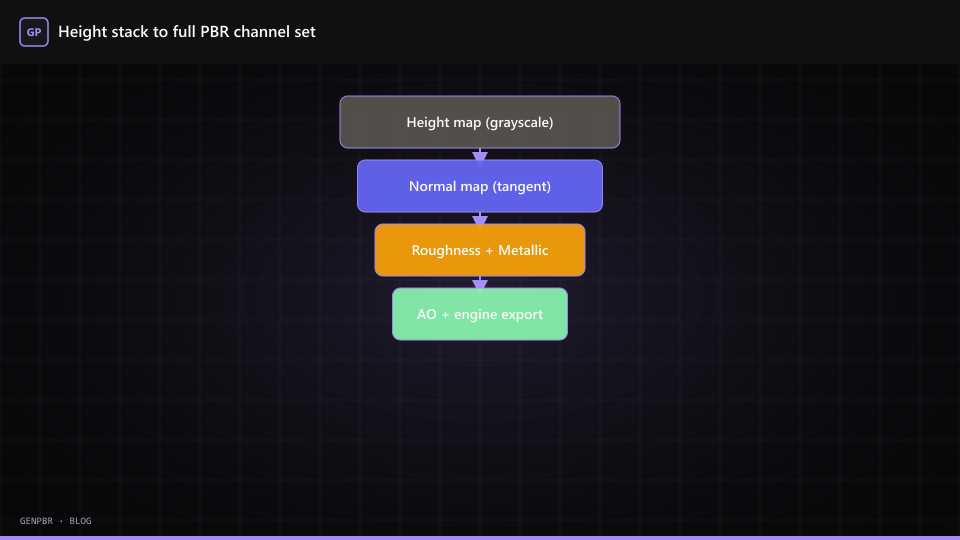
Tools like GenPBR target a different optimization: one coherent pass from plate to export.
| Capability | Classic Materialize-style | GenPBR browser workflow |
|---|---|---|
| Height → normal | Core strength | Supported via normal map generator |
| Metallic / roughness | Often manual follow-up | Generated alongside normals |
| AO approximation | Variable | Included in standard export |
| 3D preview | Desktop viewport | In-browser material ball |
| Sharing with contractors | Send installer + version | Send /generate link |
| Cost | Free desktop (platform-dependent) | Free tier + optional paid resolution |
The win is not "more filters." It is fewer handoffs between single-purpose utilities.
Migration path that does not break your backlog
We recommend a parallel week, not a hard cutover:
- Pick five representative materials from your library (metal, wood, fabric, stone, stylized).
- Run both pipelines and import into your engine (Unity, Blender, or Roblox SurfaceAppearance).
- Document deltas (usually roughness bias and normal strength, not catastrophic failure).
- Freeze naming conventions using our handoff checklist.
- Retire desktop-only steps only after one shipped milestone validates the new path.
When Materialize (or a fork) still belongs in the kit
Keep a desktop height utility if you:
- Sculpt custom height in ZBrush/Blender and only need normal conversion
- Depend on niche filters not replicated in browser tools
- Must stay 100% offline with no PWA cache
GenPBR optimizes for speed and shareability. That is a feature, not a universal replacement.
Cost and licensing notes
Materialize historically shipped as a free desktop utility, which is genuinely valuable for hobbyists. Browser tools like GenPBR also offer free public generation with optional paid tiers for higher resolution and API access.
Compare total cost including artist time: a "free" tool that costs an hour per export in glue scripts is not free.
Related reading
- GenPBR vs Materialize
- Materialize online alternative: intent hub
- Height map generator workflow
- Normal map generator complete guide
Materialize is associated with Bounding Box Software. GenPBR is an independent product; this article compares workflows, not official partnerships.
About Star
GenPBR is a professional tool for generating PBR textures using industry-leading algorithms. Create photorealistic materials for games, architecture, and 3D art with proven techniques for Unity, Unreal Engine, Blender, Maya, and Roblox.