Article
Roughness map generator workflow: from a single plate to believable metal/rough materials

How roughness maps control specular blur in PBR, what a roughness map generator should output, and a practical order of operations you can repeat in GenPBR or any metal/rough pipeline.
Last updated: April 2026. This article explains common metal/rough PBR concepts and how they relate to GenPBR’s browser workflow. Pricing, limits, and export options change over time, confirm the live Pricing page before purchasing.
What a roughness map actually controls
In metal/rough physically based shading, the roughness channel describes how much micro-surface variation blurs specular reflections. Lower roughness reads sharper highlights; higher roughness reads softer, more diffuse-looking specular lobes. It is not “shininess paint” on top of a model, it is part of a shading model that expects energy conservation and consistent color data in your base color (albedo) plate.
If you are landing from searches like roughness map generator, roughness map online, or generate roughness map, the practical goal is the same: produce a single-channel texture (often stored in the alpha of a packed mask, depending on engine) that behaves predictably under moving lights and camera angles.
A repeatable order of operations
- Stabilize base color, Fix obvious color casts and compression artifacts first. JPEG generation loss can create noise that reads as false micro-detail in derived channels.
- Decide metallic/metalness, Metal vs dielectric classification changes how you interpret specular highlights in the viewport.
- Author roughness with context, Judge roughness next to metallic and normals, not in isolation on a flat gray background.
- Add normals and larger-scale relief, Normal maps encode high-frequency surface direction; height/displacement (where supported) encodes elevation for parallax or offline rebakes.
- Bake or generate AO last for many props, AO is often view-dependent in offline rendering; in real time it is typically a darkening factor that should be tuned after the primary material reads are believable.
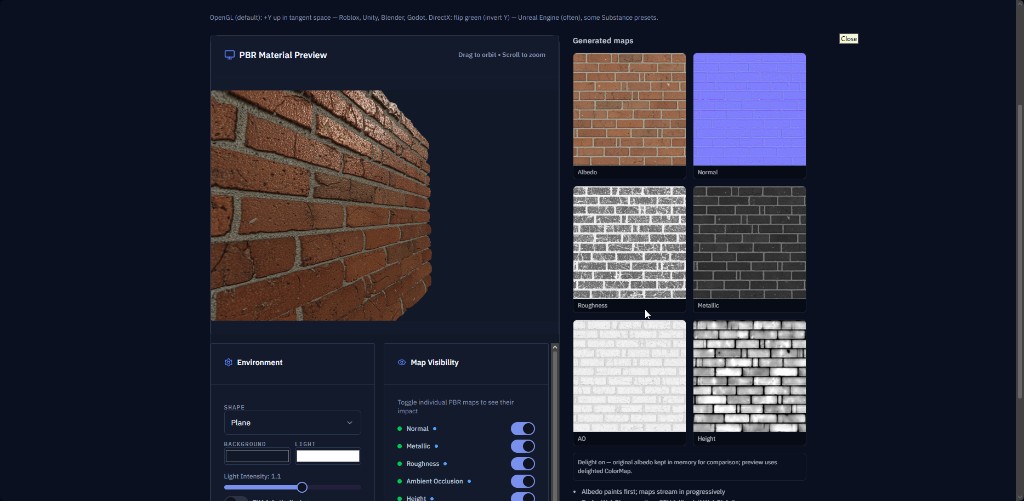
GenPBR exposes a browser-first workflow on /generate and intent-specific documentation on the roughness map generator hub page. Those pages exist so teams can bookmark a single URL that matches how people actually search.
Common pitfalls (tool-agnostic)
- Gamma surprises, Roughness is linear in modern engines. If a tool previews roughness with the wrong color space, you will mis-tune values.
- Over-sharpening, Aggressive high-pass detail can create sparkling specular noise under tight lights.
- Ignoring anisotropy, Standard metal/rough isotropic roughness will not match brushed metal references; you may need engine-specific anisotropy controls beyond a single channel.
Related reading on GenPBR
- Metallic map generator, vocabulary and engine defaults
- Normal map generator, tangent-space normals in context
- Image to PBR, how we frame full material generation from a plate
If you are comparing multiple tools, write down import rules (channel packing, sRGB vs linear) for each target engine before you commit to a pipeline, search traffic around roughness texture generator usually spikes when production deadlines are close, and import mistakes are the silent multiplier on rework.
About Star
GenPBR is a professional tool for generating PBR textures using industry-leading algorithms. Create photorealistic materials for games, architecture, and 3D art with proven techniques for Unity, Unreal Engine, Blender, Maya, and Roblox.