Article
Texture map generator handoff: naming, sRGB vs linear, and engine import sanity checks

A texture map generator is only half the job, teams lose time on handoff mistakes. Use this checklist before you zip maps for Unity, Unreal, Blender, Maya, or Roblox pipelines.
Last updated: April 2026. Naming conventions below are suggestions; align to your studio’s DAM and engine import conventions.
Why handoff breaks more often than generation
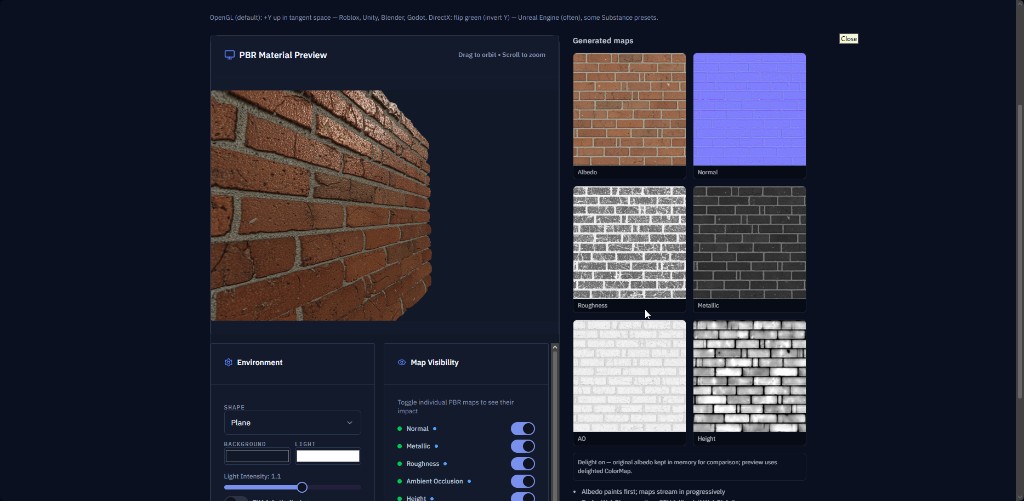
Texture map generator searches spike when teams need many channels at once: normals, metallic, roughness, AO, height, and sometimes detail masks. The failure mode is rarely “we could not generate pixels”, it is:
- Wrong linear vs sRGB flags on import
- Inconsistent UV scale between materials
- Filenames that do not sort next to each other in version control
- Packed channels that disagree with the engine’s ORM expectations
Checklist before you zip or commit
- Canonical names,
MATNAME_N.png,MATNAME_R.pngis only helpful if your importer agrees. Document the convention once in your README. - Texel density, Match texel scale across props in a hero shot, not only resolution numbers.
- Normal map format, DirectX vs OpenGL green-channel conventions still trip teams in 2026; confirm your target.
- Mask semantics, Metallic at 1.0 with a rainbow albedo is a different material family than metallic at 0.0; keep QA scenes that show both.
GenPBR hub pages for internal linking
- Texture map generator
- Create PBR textures, live tool entry (same destination many teams bookmark as “generator”)
For create PBR materials workflows in DCCs, treat the browser generator as a first-pass or look-dev accelerator, then finish with engine-specific material instances and LOD rules.
Related articles
If your team also ships Roblox experiences, pair this checklist with Roblox’s current PBR import documentation for SurfaceAppearance, those rules evolve faster than blog paragraphs can.
About Star
GenPBR is a professional tool for generating PBR textures using industry-leading algorithms. Create photorealistic materials for games, architecture, and 3D art with proven techniques for Unity, Unreal Engine, Blender, Maya, and Roblox.