Article
Height map generator from image: create displacement-ready grayscale in under 2 minutes

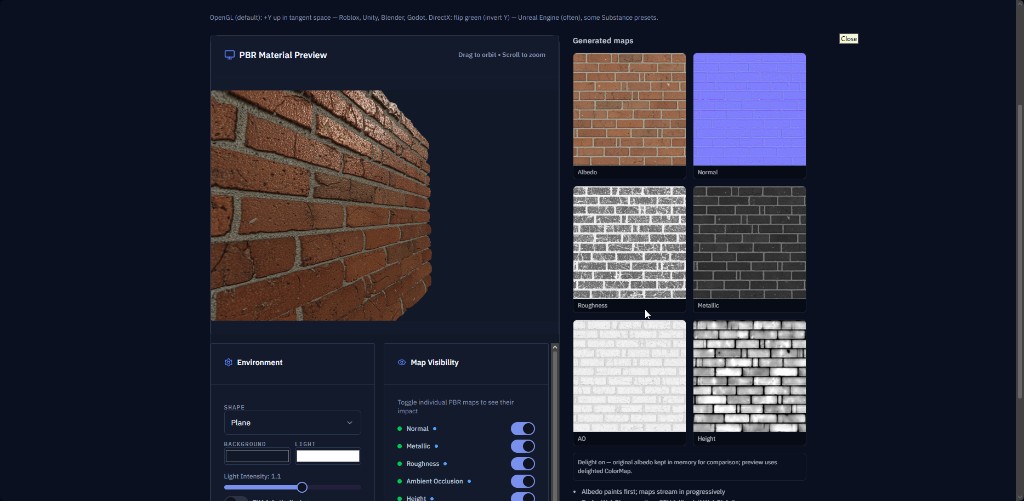
Searches for height map generator from image, image to height map, and create height map from image all share one job: turn a flat plate into elevation data your engine can read. This step-by-step guide uses GenPBR's free browser tool with 3D preview.
Last updated: August 2026. Workflow reflects GenPBR's public generator at /generate and the dedicated /height-map-generator hub.
If you searched height map generator from image, you want a fast path from a single texture plate to a grayscale elevation map your shader can read. This article walks through that path on GenPBR: upload, tune, preview in 3D, export PNG, and hand off to Unity, Unreal, Blender, or Roblox.
What "height map from image" means in practice
A height map (also spelled heightmap) stores surface elevation as grayscale:
- Brighter pixels read as higher relief
- Darker pixels read as recessed areas
Engines use height for displacement, parallax occlusion mapping (POM), tessellation, or height-based material blending. It is not the same as a normal map:
| Channel | Encodes | Typical shader use |
|---|---|---|
| Normal | Surface direction for lighting | Always in real-time PBR |
| Height | Elevation / depth | Displacement, POM, height blend |
Many materials ship both. Generate normals on the normal map generator hub, then keep height as your elevation source of truth on the height map generator page.
When image-driven height works well
Image-to-height inference estimates elevation from luminance and local contrast. It excels on:
- Stone, brick, bark, concrete, worn metal
- Macro relief where you do not have sculpt data
- Rapid iteration before committing to a high-poly sculpt bake
Use geometry bakes instead when:
- You already have a high-resolution sculpt
- Silhouette accuracy matters more than speed
- The target shader ignores height entirely
Step-by-step: height map generator from image on GenPBR
1. Pick a clean source plate
Open /generate or start from /height-map-generator.
Upload PNG when possible. JPEG blocking can become false bumps in inferred height. Good sources:
- Albedo / base color plates
- Diffuse photos with even lighting
- Tileable references with visible macro relief
2. Enable height and tune intensity
Turn on the height channel. Raise intensity until raised areas read correctly in the 3D WebGL preview. If bumps look inverted under your preview light, reduce strength before export rather than fighting it in-engine.
3. Validate against normals (optional but recommended)
If you also generated normals in the same session, orbit the preview and confirm raised features agree between normal detail and height brightness. Mismatches often mean the source plate is too noisy or heavily compressed.
4. Export grayscale PNG
Download the height map alone, or ZIP it with roughness, metallic, and normal maps from the same upload so values stay coherent.
5. Import to your engine
Unity (HDRP / URP): assign height to displacement or parallax inputs on your lit shader; mark the texture linear / non-color.
Unreal Engine: connect to displacement or POM nodes on your material; confirm the texture is not imported as sRGB.
Blender: use a Displacement modifier or parallax-style node setup on Principled BSDF; height often feeds the Height input.
Roblox SurfaceAppearance: where height is supported in your pipeline, export at power-of-two sizes and keep naming consistent with your other channels.
Common search intents, one workflow
These queries all map to the same GenPBR session:
- height map generator from image
- image to height map / image to heightmap
- create height map from image
- generate height map from image
- heightmap generator from image
- height map from image
The live tool is at /generate. The SEO hub with FAQs and engine notes is at /height-map-generator.
Grayscale height map quality tips
- Start conservative. Over-strong height looks like a bumpy sticker under HDR lighting.
- Normalize in-engine if your shader expects a specific mid-gray neutral plane.
- Pair with roughness from the same source so micro-detail and specular response stay believable.
- Tileable plates: check seams in the 3D preview before exporting large batches.
Free vs paid on GenPBR
Core height map generation on the public tool needs no signup at baseline resolution. Create a free account for 1024px, daily credits, and saved projects. Starter and Pro plans add commercial licensing, API access, and higher resolutions when production volume grows.
Related guides
- Height map generator displacement workflow (June 2026): when to pair height with parallax vs ignore it
- Image to PBR: full metal/rough stack from one upload
- Free PBR textures: generate maps from your own images instead of browsing asset packs
Quick checklist
- PNG source plate uploaded on /generate
- Height intensity tuned in 3D preview
- Grayscale PNG exported (or full ZIP set)
- Texture imported as linear / non-color in your DCC or engine
- Height connected only if the target shader actually uses it
Ready to try it? Open the free height map generator and turn your next albedo plate into displacement-ready elevation in minutes.
About Star
GenPBR is a professional tool for generating PBR textures using industry-leading algorithms. Create photorealistic materials for games, architecture, and 3D art with proven techniques for Unity, Unreal Engine, Blender, Maya, and Roblox.