Article
Height map generator update: brick displacement you can see on the plane

GenPBR's height maps keep mortar grooves and drop the speckle that looked like fur. The 3D preview now moves the mesh, so a brick plane is no longer a flat card with a normal map stuck on it.
September 27, 2026. Shot on the public GenPBR demo, Plane shape, brick albedo.
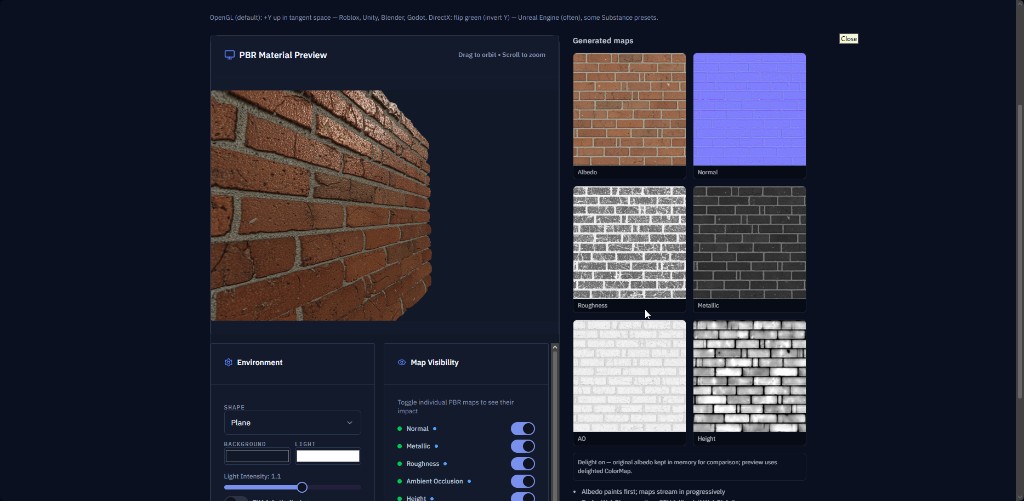
That plane started flat. The near edge does not stay flat. Brick faces sit higher than the mortar, and the height thumbnail on the right tells the same story in grayscale: lighter mortar, darker brick.
If you have been hunting a height map generator that does more than spit out a gray picture, this is the check that matters. The thumbnail and the mesh have to agree.
What was going wrong
Photo-to-height has a boring failure mode. The tool sees contrast and calls it depth.
On brick, that does two ugly things:
- Mortar gets smeared into the brick face, so the groove looks like a pillow.
- Every pit, crack speck, and JPEG block becomes a bump. The map looks furry or fuzzy, and in the viewer it still reads as a sticker because the mesh never moves.
A normal map can fake a lot of that under a moving light. It cannot change the silhouette. If you orbit the corner and the cut stays razor straight, you are looking at lighting, not height.
What this pass keeps
Large relief stays. On this plate, that is the mortar line and the overall brick face.
Anything smaller than a real groove gets smoothed before the map is stretched to full range. Stretching is what used to turn a little noise into a full coat of fur. We still want the bright and dark ends of the map to mean something. We just do not want a single dark speck to become a spike.
The same height build runs in the browser generator, on the demo, and through the API. You should not get a soft map in one place and a hairy map in another.
How to read the screenshot
Left side: the 3D preview, shape set to Plane. Drag to orbit. The front lip of the plane steps with the bricks. That is displacement, not a trick of the normal map.
Right side, bottom: Height. You can still see the brick layout. The mortar reads as its own band. The faces are quieter than the source photo, which is the point. Color noise is not elevation.
The normal map is still doing the fine lighting. Height is doing the push. If you turn Height off in Map visibility, the edge of the plane should go straight again. Turn it back on and the lip returns. That toggle is the fastest way to trust the map before you export.
Displacement starts a little higher than it used to, so the first look is obvious. Mid-gray stays on the original surface. The whole mesh does not sink. Bright goes out, dark goes in. If your material needs a deeper recess, move the slider. If it looks like the bricks are exploding off the plane, pull it back.
Make one from your own plate
- Open the height map generator or go straight to /generate.
- Upload PNG when you can. JPEG blocks become fake bumps.
- Generate height with the rest of the set if you want normal, roughness, metallic, and ambient occlusion from the same upload.
- Set the preview to Plane and orbit a corner. Confirm the silhouette moves.
- Export the grayscale PNG. In Unity, Unreal, or Blender, sample it as non-color data. If the texture is treated as a photo, the midtones shift and the displacement lies.
Roblox SurfaceAppearance still leans on the normal map for lighting. Keep the height PNG anyway if you are handing the material to a tool that can displace, or if you want the preview in GenPBR to match what you approved.
When image height is the right call
Brick, stone, bark, plaster, worn concrete. Places where the dark lines are actually lower.
Skip it, or treat the result as a first pass, when the picture has paint, decals, or stains that are not depth. A single photo cannot tell a logo from a dent. If the silhouette has to be exact, clean the plate in Blender or your sculpt tool after export.
Related
- Height map generator from image: the longer setup, from upload to engine import.
- Displacement workflow: when to connect height, and when the shader will ignore it.
- Normal map guide: the lighting channel that should match this height, not fight it.
Open the demo if you want the brick plate already loaded, or drop your own image on the height map generator.
About Star
GenPBR is a professional tool for generating PBR textures using industry-leading algorithms. Create photorealistic materials for games, architecture, and 3D art with proven techniques for Unity, Unreal Engine, Blender, Maya, and Roblox.